
What is Gearman?
Gearman provides a generic application framework to farm out work to other machines or processes that are better suited to do the work. It allows you to do work in parallel, to load balance processing, and to call functions between languages. It can be used in a variety of applications, from high-availability web sites to the transport of database replication events. In other words, it is the nervous system for how distributed processing communicates. A few strong points about Gearman:
- Open Source It’s free! (in both meanings of the word) Gearman has an active open source community that is easy to get involved with if you need help or want to contribute. Worried about licensing? Gearman is BSD.
- Multi-language - There are interfaces for a number of languages, and this list is growing. You also have the option to write heterogeneous applications with clients submitting work in one language and workers performing that work in another.
- Flexible - You are not tied to any specific design pattern. You can quickly put together distributed applications using any model you choose, one of those options being Map/Reduce.
- Fast - Gearman has a simple protocol and interface with an optimized, and threaded, server written in C/C++ to minimize your application overhead.
- Embeddable - Since Gearman is fast and lightweight, it is great for applications of all sizes. It is also easy to introduce into existing applications with minimal overhead.
- No single point of failure - Gearman can not only help scale systems, but can do it in a fault tolerant way.
- No limits on message size - Gearman supports single messages up to 4gig in size. Need to do something bigger? No problem Gearman can chunk messages.
- Worried about scaling? - Don’t worry about it with Gearman. Craig’s List, Tumblr, Yelp, Etsy,… discover what others have known for years.
Content is being updated regularly, so please check back often. You may also want to check out other forms of communication if you would like to learn more or get involved!
How Does Gearman Work?
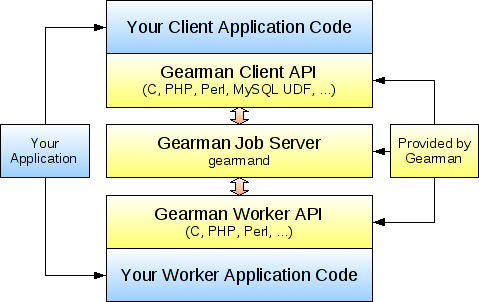
A Gearman powered application consists of three parts: a client, a worker, and a job server. The client is responsible for creating a job to be run and sending it to a job server. The job server will find a suitable worker that can run the job and forwards the job on. The worker performs the work requested by the client and sends a response to the client through the job server. Gearman provides client and worker APIs that your applications call to talk with the Gearman job server (also known as gearmand) so you don’t need to deal with networking or mapping of jobs. Internally, the gearman client and worker APIs communicate with the job server using TCP sockets. To explain how Gearman works in more detail, lets look at a simple application that will reverse the order of characters in a string. The example is given in PHP, although other APIs will look quite similar.
We start off by writing a client application that is responsible for sending off
the job and waiting for the result so it can print it out. It does this by using
the Gearman client API to send some data associated with a function name, in
this case the function reverse. The code for this is (with error handling
omitted for brevity):
<?php
// Reverse Client Code
$client = new GearmanClient();
$client->addServer();
print $client->doNormal("reverse", "Hello World!");
This code initializes a client class, configures it to use a job server with
add_server (no arguments means use 127.0.0.1 with the default port), and then
tells the client API to run the reverse function with the workload
“Hello world!”. The function name and arguments are completely arbitrary as far
as Gearman is concerned, so you could send any data structure that is
appropriate for your application (text or binary). At this point the Gearman
client API will package up the job into a Gearman protocol packet and send it to
the job server to find an appropriate worker that can run the reverse
function. Let’s now look at the worker code:
<?php
// Reverse Worker Code
$worker = new GearmanWorker();
$worker->addServer();
$worker->addFunction("reverse", function ($job) {
  return strrev($job->workload());
});
while ($worker->work());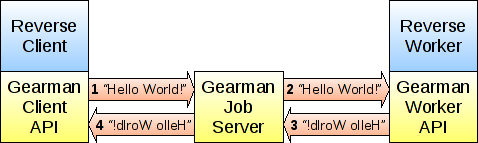
This code defines a function my_reverse_function that takes a string and
returns the reverse of that string. It is used by a worker object to register a
function named reverse after it is setup to connect to the same local job
server as the client. When the job server receives the job to be run, it looks
at the list of workers who have registered the function name reverse and
forwards the job on to one of the free workers. The Gearman worker API then
takes this request, runs the function my_reverse_function, and sends the
result of that function back through the job server to the client.
As you can see, the client and worker APIs (along with the job server) deal with the job management and network communication so you can focus on the application parts. There a few different ways you can run jobs in Gearman, including background for asynchronous processing and prioritized jobs. See the documentation available for the various APIs for details.
How Is Gearman Useful?
The reverse example above seems like a lot of work to run a function, but there are a number of ways this can be useful. The simplest answer is that you can use Gearman as an interface between a client and a worker written in different languages. If you want your PHP web application to call a function written in C, you could use the PHP client API with the C worker API, and stick a job server in the middle. Of course, there are more efficient ways of doing this (like writing a PHP extension in C), but you may want a PHP client and a Python worker, or perhaps a MySQL client and a Perl worker. You can mix and match any of the supported language interfaces easily, you just need all applications to be able to understand the workload being sent. Is your favorite language not supported yet? Get involved with the project, it’s probably fairly easy for either you or one of the existing Gearman developers to put a language wrapper on top of the C library.
The next way that Gearman can be useful is to put the worker code on a separate machine (or cluster of machines) that are better suited to do the work. Say your PHP web application wants to do image conversion, but this is too much processing to run it on the web server machines. You could instead ship the image off to a separate set of worker machines to do the conversion, this way the load does not impact the performance of your web server and other PHP scripts. By doing this, you also get a natural form of load balancing since the job server only sends new jobs to idle workers. If all the workers running on a given machine are busy, you don’t need to worry about new jobs being sent there. This makes scale-out with multi-core servers quite simple: do you have 16 cores on a worker machine? Start up 16 instances of your worker (or perhaps more if they are not CPU bound). It is also seamless to add new machines to expand your worker pool, just boot them up, install the worker code, and have them connect to the existing job server.
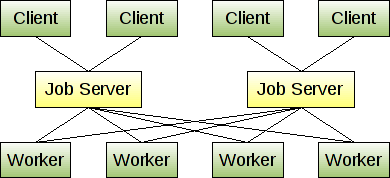
Now you’re probably asking what if the job server dies? You are able to run multiple job servers and have the clients and workers connect to the first available job server they are configured with. This way if one job server dies, clients and workers automatically fail over to another job server. You probably don’t want to run too many job servers, but having two or three is a good idea for redundancy. The diagram to the left shows how a simple Gearman cluster may look.
From here, you can scale out your clients and workers as needed. The job servers can easily handle having hundreds of clients and workers connected at once. You can draw your own physical (or virtual) machine lines where capacity allows, potentially distributing load to any number of machines. For more details on specific uses and installations, see the section on examples.
Updates to come.